Password Leak Troubleshooting: Quick Fixes and Safety
Urgent guide to respond to a password leak: identify exposed accounts, reset passwords, enable MFA, and set up breach monitoring. Learn practical steps from Leak Diagnosis to secure your digital life.


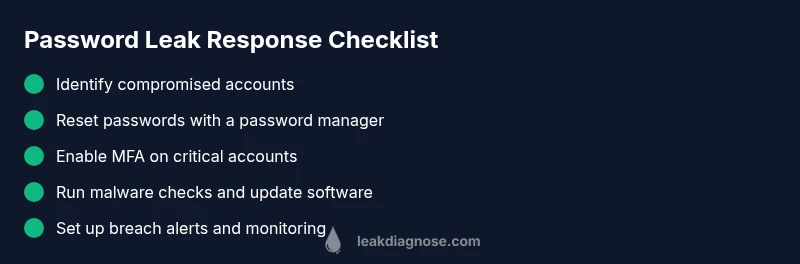
Most password leaks come from credential reuse and phishing. Quickly respond by resetting passwords on affected accounts, enabling multi-factor authentication (MFA), and reviewing other services for suspicious activity. Use a password manager to generate unique passwords, check for breach alerts, and set up ongoing monitoring to prevent future leaks. Act promptly to limit damage and restore control.
What a password leak means for your digital life
A password leak occurs when login credentials such as usernames and passwords are exposed outside of your control. In practice, this means attackers could try to access your accounts, particularly if you reuse passwords across multiple sites. The impact goes beyond a single password compromise: once an attacker has your login, they may attempt to access email, social media, banking, and other services where you use the same credentials. The risk is magnified when two common security gaps exist—password reuse across services and weak master passwords for password managers. This is where proactive password hygiene matters. According to Leak Diagnosis, password leak risk rises with credential reuse and outdated security habits. The good news is that most leaks can be contained with rapid, disciplined action and a clear plan.
Common ways attackers exploit leaked credentials
There are several familiar pathways attackers use after credentials are exposed. Credential reuse is the simplest and most effective: if you use the same password on multiple sites, a breach on one site can unlock others. Phishing remains a primary tactic: convincing messages lure you into entering credentials on fake login pages. Malware such as keyloggers or remote access Trojans can capture passwords directly from your devices. Some breaches involve third-party apps or services where your data was stored insecurely. Finally, credential stuffing attacks automate login attempts using lists of leaked usernames and passwords. The overall risk increases when your devices are not secured, when software is outdated, or when MFA is not enabled on critical accounts. The takeaway: minimize reuse, enable MFA, and stay vigilant for unusual login prompts.
Immediate checks to perform if you suspect a leak
If you suspect a password leak, start with a fast triage to limit damage. Review recent security alerts from your accounts and ensure you can access recovery options. Look for unfamiliar logins, new devices, or login attempts from unusual locations. Check your email inbox for breach notices, security alerts, or password-change prompts. Run a malware scan on all devices and ensure your operating system and apps are up to date. Finally, prepare a short incident log: note the time, the accounts affected, and what actions you took. This helps you stay organized and reproducible when you contact support.
How to reset safely and verify accounts
Resetting passwords should be done systematically. Start with your most sensitive accounts: email, cloud storage, banking, and any service that holds financial or identity data. Use a password manager to generate long, unique passwords and store them securely. After changing credentials, sign out of all sessions and devices where possible. Re-enable MFA and review recovery options to prevent lockouts. If any account remains inaccessible, use official recovery channels and document the process. Finally, consider running a full device check for malware and removing any suspicious software. This multi-step reset may take time, but it dramatically lowers the risk of ongoing unauthorized access.
Building a resilient password hygiene routine
A robust password hygiene routine is your best defense against future password leaks. Create a habit of using a password manager to generate and store unique passwords for every site. Enable MFA everywhere it’s offered, ideally with an authenticator app rather than SMS. Regularly review breached accounts and respond immediately to breach notices. Turn on breach alerts and security notifications for key services so you know when your data might be at risk. Keep a secure backup of recovery codes in a safe location and train household members to recognize phishing attempts. Finally, perform periodic checks of devices and networks for malware and maintain up-to-date software.
Long-term protection: monitoring and incident response
In the long run, the goal is proactive monitoring and rapid containment. Maintain a log of all critical accounts and set up alerts for unusual activity. Use a password manager with breach monitoring features and auto-fill protections for high-risk sites. Establish an incident response plan: who to contact, what to change, and how to document your actions. Practice safe browsing and verify the legitimacy of login prompts before entering credentials. If you suspect a major breach affecting multiple accounts, consider notifying financial institutions and credit agencies as part of your response. The combination of unique passwords, MFA, and vigilant monitoring dramatically reduces the odds that a password leak will cause lasting harm.
Steps
Estimated time: 60-90 minutes
- 1
Audit and secure access points
Begin by listing all critical accounts and devices where you log in. Change the master password for your password manager and ensure your vault is locked on all devices. Disable auto-fill on shared or public devices.
Tip: Treat the password manager as your central vault; do not reuse the master password anywhere. - 2
Identify compromised accounts
Look for signs of breach: unexpected password changes, unfamiliar login locations, or new devices on accounts you trust. Check for breach notices and security emails from services you use.
Tip: If a service has detected a breach, prioritize that site first. - 3
Reset affected passwords
Reset passwords on any account flagged by you or by breach notices. Use long, unique passwords generated by your password manager. Sign out of all sessions after the reset.
Tip: Avoid reusing passwords across sites, even on seemingly unrelated accounts. - 4
Enable MFA on critical accounts
Turn on MFA for email, banking, cloud storage, social media, and any service holding sensitive data. Prefer authenticator apps over SMS where possible.
Tip: Keep backup codes in a secure location separate from your device. - 5
Scan devices for malware
Run a full malware scan on all devices and update antivirus definitions. Remove any suspicious software and review installed extensions or apps for malicious behavior.
Tip: Keep your OS and apps up to date to reduce vulnerability windows. - 6
Set up ongoing monitoring
Enable breach alerts and security notifications for your critical services. Consider a password manager with breach monitoring features to stay ahead of leaks.
Tip: Schedule a monthly security check-in to review accounts and update passwords as needed.
Diagnosis: User suspects password leak after noticing unusual logins or breach alerts.
Possible Causes
- highCredential reuse across multiple sites
- highPhishing or credential phishing
- mediumMalware or keylogger on device
- highData breach at a service you use
- lowPassword manager sync exposure
Fixes
- easyImmediately revoke compromised credentials and reset passwords on all affected accounts.
- easyEnable multi-factor authentication (MFA) where available.
- easyUse a reputable password manager to generate unique passwords and store them securely.
- mediumRun a malware scan and update OS and apps to reduce risk of keyloggers.
- easyReview account activity and set up breach alerts with trusted services (e.g., security notifications).
Questions & Answers
What is a password leak and why should I care immediately?
A password leak happens when login credentials are exposed outside of your control, potentially allowing attackers to access multiple accounts. The risk is elevated if you reuse passwords. Acting quickly—changing affected passwords and enabling MFA—greatly reduces potential damage.
A password leak is when your login details are exposed, which can let attackers access several accounts. Act fast: change passwords and enable MFA to limit damage.
What are the first steps I should take after a suspected leak?
Begin by changing passwords on affected accounts and enabling MFA. Review recent security alerts and sign out of all sessions. Set up breach monitoring for your critical services and prepare a quick incident log.
First, change the affected passwords and enable MFA. Then review alerts and sign out of all sessions.
Is MFA enough to stop damage from a password leak?
MFA greatly reduces risk by adding a second verification step, but it isn’t foolproof. You should also use unique passwords for each site and monitor for unusual activity.
MFA helps a lot, but you still need unique passwords and ongoing monitoring.
How can I find out which accounts were compromised?
Check breach notices from services you use, review login activity and device authorizations, and watch for unusual password-change prompts. If in doubt, reset high-risk accounts first.
Look for breach notices and check login activity to spot compromised accounts.
What should I do if I can’t regain access to an account?
Use official account recovery processes and contact the service’s support for help. Document every step you take to recover access and preserve evidence of the breach.
If you can’t access an account, use the official recovery path and contact support.
What are common mistakes after a password leak?
Reusing passwords, delaying resets, ignoring MFA, and not enabling breach alerts. These habits leave you vulnerable to further exploitation.
Common mistakes include reusing passwords and not turning on MFA.
Watch Video
Main Points
- Change compromised passwords immediately
- Enable MFA everywhere possible
- Adopt a password manager for unique passwords
- Monitor accounts for unusual activity
- Regularly review breach alerts and respond quickly