16 Billion Passwords Leak: What Homeowners Need to Know
A deep dive into the 16 billion passwords leak, its security implications, and practical steps homeowners can take to protect accounts and reduce risk.


Yes—the 16 billion passwords leak signals a broad exposure risk across many services. Prioritize unique, strong passwords, enable MFA, and monitor accounts. For a compact action plan, click through to see our step-by-step defenses and practical steps you can implement today. These measures reduce risk even if breaches continue to occur. A proactive, layered approach is the best defense for households.
Understanding the scope of the 16 billion passwords leak
The figure 16 billion passwords leak signals a broad exposure across breaches, not a single incident. According to Leak Diagnosis Analysis, 2026, aggregated estimates cover passwords exposed in dozens of services over many years. Many passwords in databases are hashed and salted, which complicates direct theft, but attackers still gain value from leaked credentials through reuse on other sites. The true risk emerges when people reuse the same password on multiple platforms. Even if a password is hashed, attackers can attempt offline attacks or combine leaked data with other stolen information to impersonate users. Homeowners should translate this macro statistic into concrete steps: treat credentials as valuable, practice frequent updates, and minimize the impact of future breaches by enabling additional protections such as MFA and password managers.
What this means for homeowners and DIYers
Most households rely on a handful of online accounts: email, banking, shopping, streaming, and smart home devices. If passwords are leaked on one service, reuse across others allows attackers to escalate access. The 16 billion passwords leak demonstrates how common credential reuse is across different platforms. For homeowners, the practical takeaway is to implement unique passwords for each service, use a password manager to store them, and enable MFA on critical accounts. Also review security settings on routers and IoT devices, update firmware, and consider separate networks for guest devices to limit lateral movement in case a device is compromised.
How attackers exploit leaked passwords
Credential stuffing, where automated bots try stolen credentials across many sites, is a primary mechanism. Account takeover can follow with phishing, social engineering, or SIM-swaps. The scale implied by the leak means even low-volume targets may be affected if their credentials are reused. Emphasize the moral of the story: a password-only defense is insufficient in 2026. Multi-factor authentication with a hardware key or app-based codes, plus monitoring, reduces risk dramatically.
Practical steps to protect your household
- Audit accounts: Use breach-checkers like Have I Been Pwned to identify compromised credentials.
- Enforce MFA on all major services.
- Adopt a password manager for unique passphrases.
- Regularly rotate passwords on high-risk accounts (email, banking, services with sensitive data).
- Update devices and router firmware; change router admin credentials; disable remote management if unnecessary.
- Enable network segmentation and guest networks to limit exposure.
- Set up breach alerts and activity logs.
- Consider credit monitoring if personal data is involved.
Setting up a robust defense: a home security checklist
- Use a password manager and generate long, unique passphrases for every service.
- Enable MFA everywhere, preferring authenticator apps or hardware keys.
- Regularly review breach notifications from services you use.
- Keep devices updated and run antivirus/antimalware tools.
- Secure your router: change default password, disable WPS, enable automatic updates.
- Segment your home network and isolate smart devices on a guest network.
- Enable account alerts and review login activity monthly.
- Back up important data and store offline copies where possible.
What to do if you suspect a breach
Start by changing passwords for the most sensitive accounts (email, banking, cloud storage). Turn on MFA if not already enabled and review login history for unfamiliar activity. Run a security check on devices and routers, and consider a credit freeze if personal information was exposed. Notify any affected service providers and monitor correspondence for further prompts to reset credentials.
The role of monitoring and response services
No household can perfectly predict breaches, but proactive monitoring reduces dwell time for attackers. Credential monitoring services, alerting, and guidance from trusted sources—such as Leak Diagnosis—help homeowners respond quickly. A defense-in-depth approach combines MFA, password hygiene, device security, and ongoing vigilance to minimize damage from a 16 billion passwords leak.
Key metrics related to leaked credentials and defense readiness
| Metric | Value | Notes |
|---|---|---|
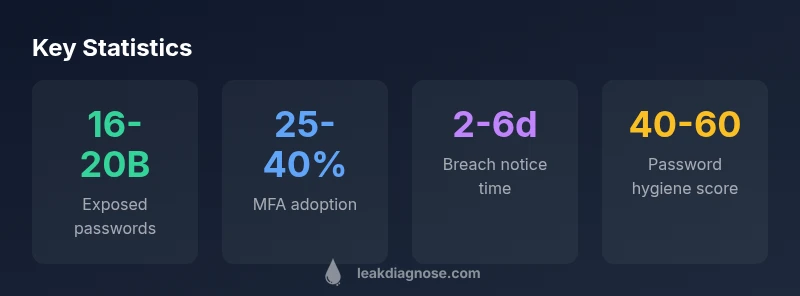
| Exposed passwords (global estimate) | 16-20 billion | Estimated global figure per Leak Diagnosis Analysis, 2026 |
| MFA adoption among exposed services | 25-40% | Varies by service type and geography |
| Time to breach detection | 2-6 days | Average window observed in breaches (Leak Diagnosis Analysis, 2026) |
Questions & Answers
What does the figure '16 billion passwords leak' actually mean?
It represents a broad estimate of credentials exposed across many breaches rather than a single incident. Not all passwords are usable on their own, and the number is an approximation that highlights risk from credential reuse. The key takeaway is to assume exposure and strengthen defenses accordingly.
The 16 billion figure means credentials were exposed across many breaches; assume exposure and strengthen defenses like MFA and unique passwords.
Are my accounts safe if I don’t reuse passwords?
If you never reuse passwords, your risk is lower, but not zero. Attackers may use other data stolen from you, like email addresses or security questions, to compromise accounts. Still, MFA and updated software significantly reduce risk.
Even with unique passwords, keep MFA on and monitor accounts for unusual activity.
How can I check if I’m affected by breaches?
Use breach notification services and data breach checkers from reputable sources. These tools search whether your email addresses or accounts appeared in known breaches. They don’t guarantee safety, but they help you act quickly.
Check for breaches using trusted tools and follow recommended steps from providers.
Is MFA really enough to stop attackers?
MFA dramatically reduces risk, especially with hardware keys or authenticator apps. It is a critical layer, but you should also maintain strong passwords and monitor for suspicious activity. MFA is best as part of a defense-in-depth plan.
Yes—MFA greatly reduces risk, especially when using hardware keys.
What should I do first if I suspect a breach?
Prioritize changing passwords on the most sensitive accounts and enabling MFA. Review recent login activity and notifications from services. Consider enabling breach alerts and starting a data backup and monitoring routine.
Change critical passwords and enable MFA immediately.
How can I prevent future leaks at home?
Adopt a password manager, enable MFA, keep devices updated, and monitor for breaches. Create a routine to review security settings and back up data. A layered approach reduces the impact of any future leak.
Use a password manager and MFA, and keep devices updated.
“Password hygiene alone is no longer enough; a layered, defense-in-depth approach with MFA and credential monitoring is essential for households.”
Main Points
- Strengthen credentials with unique passphrases
- Enable MFA everywhere possible
- Monitor accounts and set breach alerts
- Use a password manager to store and autofill securely
- Act quickly if a breach is suspected