Data Leak Troubleshooting Guide for Home Networks
Urgent, practical guide to detect, diagnose, and prevent data leaks in home networks and devices. Learn step-by-step troubleshooting, safe fixes, and when to call a pro.


A data leak is usually caused by weak credentials, unpatched software, or misconfigured devices. Start by updating firmware, enabling two-factor authentication, and reviewing exposure settings on smart devices and apps. If symptoms persist, isolate devices, run a security scan, and consider professional help.
What is a data leak?
A data leak is an unauthorized exposure of sensitive information that can happen when data leaves its intended boundary and becomes accessible to others. In a home context, this often means login credentials, emails, financial details, or device data being exposed through insecure connections, cloud backups, or misconfigured apps. IoT devices like smart speakers, cameras, and thermostats add convenience but also create new avenues for leaks if not managed carefully. Understanding how data leaks happen helps you spot warning signs early and take concrete steps to reduce risk across your home network and connected services. This guide emphasizes practical actions you can take now to diagnose exposure, close gaps, and prevent future leaks.
Why data leaks happen in homes with smart devices
Smart devices offer convenience but introduce new attack surfaces. Many IoT products come with weak passwords or rely on vendor cloud services that mishandle data. Outdated firmware or apps with known vulnerabilities can be exploited by attackers or legitimate apps with broad data access. An unsecured Wi‑Fi network, a poorly secured guest network, or IoT devices sharing data on the same network can leak information to unintended recipients. Phishing or credential harvesting can compromise accounts that then give attackers access to multiple devices and services. In short, the combination of convenience, complexity, and variable user behavior creates opportunities for data leaks unless you practice solid digital hygiene.
Signs your home network may be leaking data
Look for patterns rather than one-off incidents. Signs include password reset alerts for accounts you don’t recall touching, login attempts from unfamiliar locations, or new devices appearing on your network. You may notice unusual spikes in data usage in your router’s admin page or your ISP portal, even when you aren’t streaming or downloading heavily. Apps may request permissions you don’t remember granting, or cloud backups could trigger at odd times. If you have smart cameras or speakers, check for unusual activity or responses you didn’t initiate. The telltale clue is repeated anomalies across multiple devices and services.
Immediate steps to take if you suspect a data leak
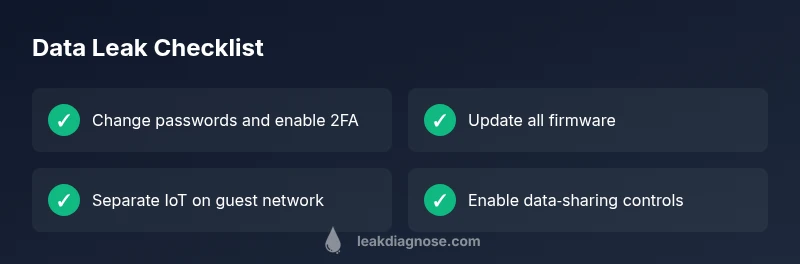
Containment matters. Immediately change passwords for compromised accounts and enable two‑factor authentication where available. Update firmware on your router, modem, and IoT devices to the latest versions. Tighten data sharing permissions in apps, services, and cloud storage, and consider isolating IoT devices on a separate guest network. Run reputable anti‑malware scans on primary devices and monitor for unfamiliar activity. Document changes and set up ongoing monitoring so you catch problems early. If the leak seems serious or you cannot identify the source, contact service providers or a security professional for guidance.
A practical diagnostic flow you can follow
Start with a simple, repeatable flow. Symptom: unexpected data activity or unfamiliar logins. Then diagnose by checking for weak passwords, default credentials, and outdated firmware. Apply fixes: update software, strengthen passwords, enable 2FA, and isolate affected devices on a guest network. If issues persist, review router logs, monitor cloud service activity, and run malware scans. Finally, establish ongoing monitoring: enable alerts for accounts, use a password manager, and schedule regular privacy audits.
Long‑term prevention and maintenance
Prevention is cheaper than remediation. Use strong, unique passwords for every service and store them in a reputable password manager. Enable two‑factor authentication everywhere you can, and keep firmware on routers and IoT devices up to date. Disable unnecessary features like remote admin and WPS. Consider network segmentation: keep IoT devices on a separate guest network and avoid bridging them to your primary devices. Regularly review app permissions and data sharing settings, and implement secure backups with versioning. Finally, stay informed about vendor privacy practices and phishing threats, as many leaks begin with social engineering.
How to audit data flows in your home (quick tips)
A practical audit helps you stay ahead of leaks. Map all devices and identify the data each one can access. Check for unusual login activity in cloud accounts and review the permissions granted to apps. Ensure your router firewall is active and that a guest network is in place for IoT devices. Use a password manager and enable 2FA across services. Schedule quarterly privacy reviews and keep a simple incident response plan ready.
Steps
Estimated time: 60-120 minutes
- 1
Audit and secure your accounts
Start by auditing all critical accounts for password strength and unusual activity. Enable two‑factor authentication and remove access from unused devices. Consider a password manager to generate and store unique passwords.
Tip: Use a password manager to enforce strong, unique passwords. - 2
Update and patch devices
Check for firmware and app updates on your router, IoT devices, computers, and smartphones. Enable automatic updates where possible and ensure you install security patches as soon as they’re released.
Tip: Turn on automatic updates when feasible to close vulnerabilities quickly. - 3
Separate IoT devices on a guest network
Create a distinct guest network for IoT devices to limit cross‑device access. Disable universal plug and play and remote administration on IoT hubs where possible.
Tip: Limit inter‑device communication to essential paths only. - 4
Review data sharing settings
Go through each app and service to review data permissions. Revoke access you don’t need and disable unnecessary cloud backups for sensitive data.
Tip: Restrict data flow to essential services only. - 5
Monitor and secure accounts
Set up activity alerts for your bank, email, and social accounts. Regularly check for unfamiliar devices and sign‑ins, and respond quickly to any notification.
Tip: Create alert rules to catch odd activity early. - 6
Back up and recover
Establish secure backups with versioning for important data. Test restore procedures so you can recover quickly after an incident.
Tip: Keep offline backups for added protection.
Diagnosis: Unusual data activity or exposure detected on home accounts or devices
Possible Causes
- highWeak or reused passwords across services
- highUnsecured Wi‑Fi or router misconfigurations
- mediumOutdated firmware or apps with known vulnerabilities
- mediumMalware or spyware on devices accessing data
- lowPhishing or credential harvesting leading to account compromise
Fixes
- easyChange compromised passwords and enable multi‑factor authentication
- easyUpdate router firmware and disable remote admin
- easyRun malware scans on devices and remove threats
- mediumReview and tighten app permissions, data sharing, and cloud backups
- mediumSet up a segregated guest network for IoT devices and monitor traffic
- hardConsult a data‑security professional for advanced threat hunting if needed
Questions & Answers
What is a data leak?
A data leak is an unauthorized exposure of sensitive information that can occur when data leaves its intended boundary. In homes, leaks often involve credentials, emails, or device data exposed through weak security or misconfigurations.
A data leak is when private information becomes exposed due to weak security or misconfiguration. Here’s how to spot and stop it.
How can I tell if my devices have been compromised?
Look for unfamiliar logins, unexpected data usage, new devices on your network, or prompts for passwords you don’t recognize. Run malware scans and verify app permissions. If you see anything suspicious, act quickly to contain the issue.
Unusual logins or device activity can signal a compromise. Run scans and tighten security right away.
What should I do immediately if I notice suspicious activity?
Change passwords, enable 2FA, update firmware, and isolate affected devices on a guest network. Review permissions and back up important data. If the issue continues, contact service providers or a security professional.
Change passwords, enable 2FA, update devices, and isolate affected gear. Contact professionals if it continues.
Can data leaks be prevented entirely?
No single fix guarantees complete prevention, but you can significantly reduce risk with layered security: strong passwords, 2FA, regular updates, network segmentation, and consistent monitoring.
You can’t prevent every leak, but you can greatly reduce the risk with layered security and monitoring.
Should I involve a professional for data leak issues?
For complex or ongoing leaks, especially involving bank accounts or business data, consult a data‑security professional. They can perform deeper threat hunting and forensics.
If the leak is serious or persistent, a professional can help with in‑depth checks.
Watch Video
Main Points
- Identify exposure quickly and contain it
- Secure networks and devices before data flows
- Enable continuous monitoring and alerts
- Back up data and have a response plan